|
|
This project develops the data accessing application using ADO 2.0 on VB6
with Access Database
and implements the data transaction process within ADO
function calls.
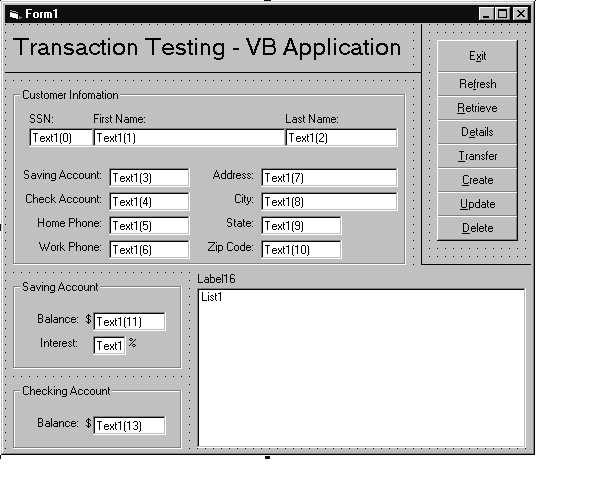
In the VB Database programming application, I use the controls:
* Label controls Mark the name of the data fields
* TextBox controls Input and display the value of data
from and to the user
* ListBox controls Display the value
of primary key in the tables. It takes advantage of the read-only
feature of ListBox to prevent the
displayed data from user modification.
* InputBox
controls Prompt user with the input request.
Other key properities of the ADO Data Control:
* BOF
Determine what the ADO does when the user moves to the begining of the file. The
options
are to set the BOF flag for the
cursor or move to the first record of the cursor.
* EOF
Determine what the ADO does when the user moves to the end of the file. The
options are
to set the EOF flag for the
cursor, move to the last record of the cursor, or add a new record.
Transaction programming design:
Connection.BeginTrans()
on error goto Foo:
1. withdraw the transfer amount from saving account
2. credit the transfer amount to checking account
3. do some other related operation like Log the transfer, Inform other dept. in the bank ...
Connection.CommiTrans()
Exit function
Foo:
connection.RollbackTrans()
Exit function
After executing the statement Connection.BeginTrans(), a transaction is
started. As long as any error occurs
at the process 1, 2 or 3, program
execution swithes to the branch Foo. At this moment, ADO function
Connection.RollbackTrans() aborts the transaction and the data roles back to
its' original status. Otherwise,
all operations are successful,
Connection.CommitTrans() confirms the execution and commit the transaction.
Source Code:
Private Const MYDSN As String = "DSN=test_trans;UID=tzhou;PWD=tzhou;"
Private Sub Form_Load()
' Initializate the fields
For i = 0 To 13
Text1(i).Text = ""
Next i
List1.Clear
Label16.Caption = ""
End Sub
Private Sub Command1_Click()
' Exit()
End
End Sub
Private Sub Command2_Click()
' Refresh()
For i = 0 To 13
Text1(i).Text = ""
Next i
List1.Clear
Label16.Caption = ""
End Sub
Private Sub Command3_Click()
' Retrieve()
Dim s_first_name, sql As String
On Error GoTo error_handler
Dim conn As ADODB.Connection
Dim rs As ADODB.Recordset
Set conn = New ADODB.Connection
conn.Open MYDSN
If conn Is Nothing Then
MsgBox
"Create connection failed. Check if you installed the ADO component in your
machine.", vbOKOnly
Exit Sub
End If
sql = "SELECT SSN, saving_account,
checking_account, first_name, last_name FROM CUSTOMER"
Set rs = New ADODB.Recordset
rs.Open sql, conn, adOpenStatic
If rs.EOF Then
Label16.Caption = "Result of operation."
List1.AddItem "No data in the table of CUSTOMER."
Else
Label16.Caption =
CStr("SSN
Saving
Check First_Name
Last_Name")
Do While
Not rs.EOF
s_first_name = CStr(rs(3))
If Len(s_first_name) > 10 Then s_first_name = Left(s_first_name, 10)
List1.AddItem CLng(rs(0)) & " " &
CLng(rs(1)) & " " & CLng(rs(2)) &
" " & s_first_name & vbTab &
" " & CStr(rs(4))
rs.MoveNext
Loop
End If
' Release the resource
If rs.state = adStateOpen Then
rs.Close
Set rs = Nothing
If conn.state = adStateOpen Then
conn.Close
Set conn = Nothing
Exit Sub
error_handler:
MsgBox CStr(Err.Number) & ". ["
& Err.Source & "] " & Err.Description, vbOKOnly
End Sub
Private Sub Command4_Click()
' Details()
Dim i, ssn As Long
Dim sql As
String
If Trim(Text1(0).Text) <> "" Then
ssn = CLng(Trim(Text1(0).Text))
Else
MsgBox "Missing input on Social Security Number", vbOKOnly
Exit Sub
End If
If InStr(1, Trim(List1.List(0)), vbTab) = 0 Then
Label16.Caption = ""
List1.Clear
End If
On Error GoTo error_handler
Dim conn As ADODB.Connection
Dim rs As ADODB.Recordset
Set conn = New ADODB.Connection
conn.Open MYDSN
If conn Is Nothing Then
MsgBox
"Create connection failed. Check if you installed the ADO component in your
machine.", vbOKOnly
Exit Sub
End If
sql = "SELECT * FROM CUSTOMER
WHERE SSN = " & ssn
Set rs =
New ADODB.Recordset
rs.Open sql,
conn
If rs.EOF Then
For i = 1
To 10
Text1(i).Text = ""
Next i
Label16.Caption = "Result of operation."
List1.Clear
List1.AddItem "No record determined by Social Security Number of " & ssn
& " exists in Database."
Else
Text1(1).Text = CStr(rs("first_name"))
Text1(2).Text = CStr(rs("last_name"))
If Not
IsNull(rs("saving_account")) Then Text1(3).Text = CLng(rs("saving_account"))
If Not
IsNull(rs("checking_account")) Then Text1(4).Text = CLng(rs("checking_account"))
If Not
IsNull(rs("home_phone")) Then Text1(5).Text = CStr(rs("home_phone"))
If Not
IsNull(rs("work_phone")) Then Text1(6).Text = CStr(rs("work_phone"))
If Not
IsNull(rs("address")) Then Text1(7).Text = CStr(rs("address"))
If Not
IsNull(rs("city")) Then Text1(8).Text = CStr(rs("city"))
If Not
IsNull(rs("state")) Then Text1(9).Text = CStr(rs("state"))
If Not
IsNull(rs("zip_code")) Then Text1(10).Text = CStr(rs("zip_code"))
End If
If Trim(Text1(3).Text) <> ""
Then
sql
= "SELECT * from SAVING WHERE saving_account = " & CLng(Trim(Text1(3).Text))
If
rs.state = adStateOpen Then rs.Close
rs.Open
sql, conn
Text1(11).Text = CLng(rs("balance"))
Text1(12).Text = CSng(rs("interest"))
End If
If Trim(Text1(4).Text) <> ""
Then
sql
= "SELECT * from CHECKING WHERE checking_account = " &
CLng(Trim(Text1(4).Text))
If
rs.state = adStateOpen Then rs.Close
rs.Open
sql, conn
Text1(13).Text = CLng(rs("balance"))
End If
' Release the resource
If rs.state = adStateOpen Then
rs.Close
Set rs = Nothing
If conn.state = adStateOpen Then
conn.Close
Set conn = Nothing
Exit Sub
error_handler:
MsgBox CStr(Err.Number) & ". ["
& Err.Source & "] " & Err.Description, vbOKOnly
End Sub
Private Sub Command5_Click()
' Transsaction test
Dim inTransaction As Boolean: inTransaction = False
Dim amount_saving As Currency, amount_check As Currency
Dim ssn As Long, ac_saving As Long, ac_check As Long
Dim mesg As String
Dim
amount_trans As Variant
If Trim(Text1(0).Text) <> "" Then
ssn = CLng(Trim(Text1(0).Text))
Else
MsgBox "Missing input on Social Security Number", vbOKOnly + vbExclamation
Exit Sub
End If
' Clear the fields except Social Security Number
For i = 1 To 13
Text1(i).Text = ""
Next i
List1.Clear
Label16.Caption = ""
On Error GoTo error_handler
Dim conn As ADODB.Connection
Dim rs As ADODB.Recordset
Set conn = New ADODB.Connection
conn.Open MYDSN
If conn Is Nothing Then
MsgBox
"Create connection failed. Check the Data Source Name and user privilege for log
in.", vbOKOnly + vbExclamation
Exit Sub
End If
' Get the account numbers
sql = "SELECT saving_account,
checking_account FROM CUSTOMER WHERE SSN = " & ssn
Set rs = New ADODB.Recordset
rs.Open sql, conn
If rs.EOF Then
Label16.Caption = "Result of operation."
List1.Clear
List1.AddItem "No record determined by Social Security Number of " & n &
" exists in Database."
Else
If
IsNull(rs("saving_account")) Then
MsgBox "The customer does not have saving account. Can't do money transfer at
this moment!", vbOKOnly + vbExclamation
Exit Sub
ElseIf IsNull(rs("checking_account")) Then
MsgBox "The customer does not have checking account. Can't do money transfer at
this moment!", vbOKOnly + vbExclamation
Exit Sub
Else
ac_saving = CLng(rs("saving_account"))
Text1(3).Text = ac_saving
ac_check = CLng(rs("checking_account"))
Text1(4).Text = ac_check
End If
End If
' Get the account balances
sql = "SELECT * from SAVING WHERE
saving_account = " & ac_saving
If rs.state = adStateOpen Then
rs.Close
rs.Open sql, conn
amount_saving =
CLng(rs("balance"))
Text1(11).Text = amount_saving
sql = "SELECT * from CHECKING
WHERE checking_account = " & ac_check
If rs.state = adStateOpen Then
rs.Close
rs.Open sql, conn
amount_check =
CLng(rs("balance"))
Text1(13).Text = amount_check
' Get the transfer amount
mesg = "Transfer money from
saving account to checking account." & _
"Please
input the transfer amount:" & vbCrLf & _
"(You can
use negative number to transfer from checking to saving account.)"
amount_trans = InputBox(mesg,
"Money Transfer")
If amount_trans
<> "" Then
amount_trans = CCur(amount_trans)
Else
Call
LogFile(CStr(Now) & vbTab & "Request" & vbTab & CCur(0))
Exit Sub
End If
' Log the transfer request
Call LogFile(CStr(Now) &
vbTab & "Request" & vbTab & CCur(amount_trans) & _
vbTab
& amount_saving & vbTab & amount_check)
' Can not do transfer
If amount_trans > 0 And
amount_saving < amount_trans Then
Label16.Caption = "Result of operation."
mesg =
"You don't have enough money in the saving account to transfer."
List1.AddItem mesg
Call
LogFile(CStr(Now) & vbTab & "Failed" & vbTab & amount_trans
& vbTab & _
amount_saving & vbTab & " " & vbTab & mesg)
Exit Sub
End If
If amount_trans < 0 And
Abs(amount_trans) > amount_check Then
Label16.Caption = "Result of operation."
mesg =
"You don't have enough money in the checking account to transfer."
List1.AddItem mesg
Call
LogFile(CStr(Now) & vbTab & "Failed" & vbTab & amount_trans
& vbTab & _
" " & vbTab & amount_check & vbTab & mesg)
Exit Sub
End If
' Start the transaction
' conn.BeginTrans '
this operation is not good for ODBC Office 97 Driver
inTransaction = True
' Transfer the money ...
If rs.state = adStateOpen Then
rs.Close
sql = "UPDATE SAVING SET
balance = " & CCur(amount_saving - amount_trans) & _
" WHERE
saving_account = " & ac_saving
conn.Execute sql
' Err.Raise 100, "Testing",
"Suppose the transaction operations are interrupted at this moment."
' MsgBox CStr(Err.Number) & ".
[" & Err.Source & "] " & Err.Description, vbOKOnly + vbExclamation
sql = "UPDATE CHECKING SET balance
= " & CCur(amount_check + amount_trans) & _
" WHERE
checking_account = " & ac_check
conn.Execute sql, rowsAffected
' Transaction is successful at
this point. Commit the transaction
'
conn.CommitTrans ' this operation is not good for
ODBC Office 97 Driver
Call
LogFile(CStr(Now) & vbTab & "Success" & vbTab & " " & _
vbTab
& CCur(amount_saving - amount_trans) & _
vbTab
& CCur(amount_check + amount_trans))
Label16.Caption = "Result of
operation."
List1.AddItem
"Transfer of $" & amount_trans & " succeed."
' Release the resource
Set rs = Nothing
If conn.state = adStateOpen Then
conn.Close
Set conn = Nothing
Exit Sub
error_handler:
If inTransaction Then
' Transaction failed after
catching some error. RollbackTrans the transaction
'
conn.RollbackTrans ' this operation is
not good for ODBC Office 97 Driver
Call LogFile(CStr(Now) &
vbTab & "Failed" & vbTab & CCur(amount_trans) & vbTab & _
" " &
vbTab & " " & vbTab & "[" & Err.Source & "] " &
Err.Description)
sql = "UPDATE SAVING SET balance =
" & CCur(amount_saving) & _
" WHERE
saving_account = " & ac_saving
conn.Execute sql
sql = "UPDATE CHECKING SET balance
= " & CCur(amount_check) & _
" WHERE
checking_account = " & ac_check
conn.Execute sql
Label16.Caption = "Result of
operation."
List1.AddItem
"Transfer of $" & amount_trans & " failed."
List1.AddItem "Operations are
rolled back to accounts' original stages."
' Release the resource
Set rs = Nothing
If conn.state = adStateOpen Then
conn.Close
Set conn = Nothing
End If
End Sub
Private Sub Command6_Click()
' Create a new account
Dim ssn, ac_save, ac_check As Long
Dim fname, lname, ph_home, ph_work, address, city, state, zip As String
Dim bal_save, bal_check As Currency
Dim interest As Single
Dim i As
Integer
If Text1(0).Text = "" Then
MsgBox "Invalid input. Please
input the valid SSN.", vbOKOnly + vbExclamation, "Input validation"
Exit Sub
End If
ssn = CLng(Text1(0).Text)
fname =
Text1(1).Text
lname = Text1(2).Text
ph_home = Text1(5).Text
ph_work =
Text1(6).Text
address = Text1(7).Text
city = Text1(8).Text
state =
Text1(9).Text
zip = Text1(10).Text
If Text1(3).Text <> "" Then
ac_save = CLng(Text1(3).Text)
bal_save = CCur(Text1(11).Text)
interest = CSng(Text1(12).Text)
End If
If Text1(4).Text <> "" Then
ac_check = CLng(Text1(4).Text)
bal_check = CCur(Text1(13).Text)
End If
On Error GoTo error_handler
Dim conn As ADODB.Connection
Dim rs As ADODB.Recordset
Set conn = New ADODB.Connection
conn.Open MYDSN
If conn Is Nothing Then
MsgBox
"Create connection failed. ", vbOKOnly
Exit Sub
End If
sql = "SELECT saving_account,
checking_account FROM CUSTOMER WHERE SSN = " & ssn
Set rs = New ADODB.Recordset
rs.Open sql, conn, adOpenStatic
If Not rs.EOF Then
MsgBox
"Your account under SSN (" & ssn & ") already exists, please use
'Update' to modify the information. ", vbOKOnly + vbInformation
Exit Sub
End If
If rs.state = adStateOpen Then
rs.Close
If Text1(3).Text
<> "" Then
sql =
"SELECT SSN FROM CUSTOMER WHERE saving_account = " & ac_save
rs.Open
sql, conn, adOpenStatic
If Not
rs.EOF Then
MsgBox "The saving account (" & ac_save & ") already exists, please
input another number. ", vbOKOnly + vbInformation
Exit Sub
End If
End If
If rs.state = adStateOpen Then
rs.Close
If Text1(4).Text
<> "" Then
sql =
"SELECT SSN FROM CUSTOMER WHERE checking_account = " & ac_check
rs.Open
sql, conn, adOpenStatic
If Not
rs.EOF Then
MsgBox "The checking account (" & ac_check & ") already exists, please
input another number. ", vbOKOnly + vbInformation
Exit Sub
End If
End If
If Text1(3).Text = "" And
Text1(4).Text = "" Then
sql =
"INSERT into CUSTOMER (SSN, first_name, last_name, " & _
"home_phone, work_phone, address, city, state, zip_code) " & _
"values (" & ssn & ", '" & fname & "', '" & lname & "',
'" & _
ph_home & "', '" & ph_work & "', '" & address & "', '" &
city & "', '" & state & "', '" & zip & "')"
ElseIf Text1(3).Text = "" Then
sql =
"INSERT into CUSTOMER (SSN, first_name, last_name, checking_account, " & _
"home_phone, work_phone, address, city, state, zip_code) " & _
"values (" & ssn & ", '" & fname & "', '" & lname & "',
" & ac_check & ", '" & _
ph_home & "', '" & ph_work & "', '" & address & "', '" &
city & "', '" & state & "', '" & zip & "')"
ElseIf Text1(4).Text = "" Then
sql =
"INSERT into CUSTOMER (SSN, first_name, last_name, saving_account, " & _
"home_phone, work_phone, address, city, state, zip_code) " & _
"values (" & ssn & ", '" & fname & "', '" & lname & "',
" & ac_save & ", '" & _
ph_home & "', '" & ph_work & "', '" & address & "', '" &
city & "', '" & state & "', '" & zip & "')"
Else
sql =
"INSERT into CUSTOMER (SSN, first_name, last_name, saving_account,
checking_account, " & _
"home_phone, work_phone, address, city, state, zip_code) " & _
"values (" & ssn & ", '" & fname & "', '" & lname & "',
" & ac_save & ", " & ac_check & ", '" & _
ph_home & "', '" & ph_work & "', '" & address & "', '" &
city & "', '" & state & "', '" & zip & "')"
End If
conn.Execute sql, i
If i <> 1 Then
MsgBox
"The create process failed. Please try again later. ", vbOKOnly + vbExclamation
Exit Sub
End If
On Error GoTo 0
' Release the resource
Set rs =
Nothing
If conn.state = adStateOpen Then conn.Close
Set conn = Nothing
MsgBox "The creation of your new account succeeded.",
vbOKOnly + vbInformation
Exit Sub
error_handler:
MsgBox Err.Number & ". [" &
Err.Source & "]: " & Err.Description, vbOKOnly
End Sub
Private Sub Command7_Click()
' Modify the attributes
of the account
Dim ssn, ac_save, ac_check As Long
Dim fname, lname, ph_home, ph_work, address, city, state, zip As String
Dim bal_save, bal_check As Currency
Dim interest As Single
Dim i As
Integer
If Text1(0).Text = "" Then
MsgBox "Invalid input. Please
input the valid SSN.", vbOKOnly + vbExclamation, "Input validation"
Exit Sub
End If
ssn = CLng(Text1(0).Text)
fname =
Text1(1).Text
lname = Text1(2).Text
ph_home = Text1(5).Text
ph_work =
Text1(6).Text
address = Text1(7).Text
city = Text1(8).Text
state =
Text1(9).Text
zip = Text1(10).Text
If Text1(3).Text <> "" Then
ac_save = CLng(Text1(3).Text)
bal_save = CCur(Text1(11).Text)
interest = CSng(Text1(12).Text)
End If
If Text1(4).Text <> "" Then
ac_check = CLng(Text1(4).Text)
bal_check = CCur(Text1(13).Text)
End If
On Error GoTo error_handler
Dim conn As ADODB.Connection
Dim rs As ADODB.Recordset
Set conn = New ADODB.Connection
conn.Open MYDSN
If conn Is Nothing Then
MsgBox
"Update connection failed. ", vbOKOnly
Exit Sub
End If
'sql = "SELECT saving_account,
checking_account FROM CUSTOMER WHERE SSN = " & ssn
sql = "SELECT * FROM CUSTOMER
WHERE SSN = " & ssn
Set rs =
New ADODB.Recordset
rs.Open sql,
conn, adOpenStatic
If rs.EOF Then
MsgBox
"Your account under SSN (" & ssn & ") does not exists, please use
'Create' to create new account. ", vbOKOnly + vbInformation
Exit Sub
End If
' If rs.state = adStateOpen Then rs.Close
' rs!first_name = fname
' rs!last_name = lname
' rs!home_phone = ph_home
' rs!work_phone = ph_work
' rs!address = address
' rs!city = city
' rs!state = state
' rs!zip_code = zip
' rs!saving_account = ac_save
' rs!checking_account = ac_check
' If rs.state = adStateOpen Then
rs.Close
' If Text1(3).Text
<> "" Then
' sql =
"SELECT SSN FROM CUSTOMER WHERE saving_account = " & ac_save
' rs.Open
sql, conn, adOpenStatic
' If Not
rs.EOF Then
'
MsgBox "The saving account (" & ac_save & ") already exists, please
input another number. ", vbOKOnly + vbInformation
'
Exit Sub
'
End If
' End If
'
' If rs.state = adStateOpen Then
rs.Close
' If Text1(4).Text
<> "" Then
' sql =
"SELECT SSN FROM CUSTOMER WHERE checking_account = " & ac_check
' rs.Open
sql, conn, adOpenStatic
' If Not
rs.EOF Then
'
MsgBox "The checking account (" & ac_check & ") already exists, please
input another number. ", vbOKOnly + vbInformation
'
Exit Sub
'
End If
' End If
' sql = "UPDATE CUSTOMER SET
first_name = " & fname & ", last_name = " & lname &
", WHERE SSN = " & ssn
'
' sql = "UPDATE CUSTOMER SET
first_name = " & fname & " WHERE SSN = " & ssn
sql = "UPDATE CUSTOMER SET
first_name = " & fname & ", last_name = " & lname & ",
saving_account = " & ac_save & ", checking_account = " & ac_check
& ", " & _
"home_phone=" & ph_home & ", work_phone = " & ph_work & ",
address = " & "'" & address & "'" & ", city = " & city &
", state = " & "'" & state & "'" & ", zip_code = " & zip
& _
" WHERE SSN = " & ssn
'conn.Execute sql, i
conn.Execute sql
' If i <> 1 Then
' MsgBox
"The update process failed. Please try again later. ", vbOKOnly + vbExclamation
' Exit Sub
' End If
If rs.state = adStateOpen Then rs.Close
On Error GoTo 0
' Release the resource
Set rs =
Nothing
If conn.state = adStateOpen Then conn.Close
Set conn = Nothing
MsgBox "The update of your new account succeeded.",
vbOKOnly + vbInformation
Exit Sub
error_handler:
MsgBox Err.Number & ". [" &
Err.Source & "]: " & Err.Description, vbOKOnly
End Sub
Private Sub Command8_Click()
' Delete a account
Dim ssn, ac_save, ac_check As Long
Dim fname, lname, ph_home, ph_work, address, city, state, _
zip As String
Dim bal_save, bal_check As Currency
Dim interst As Single
Dim i As
Integer
Dim sql As String
Dim
response As Integer
Dim prompt
prompt = "Are you sure
you want to delete this record?"
response =
MsgBox(prompt, vbYesNo + vbQuestion)
If response = vbNo Then
Exit Sub
End If
If Text1(0).Text = "" Then
Dim prompt As String
prompt = "Invalid input. Please
input the valid ssn."
MsgBox
(prompt), vbOKOnly + vbExclamation
Exit Sub
End If
ssn = CLng(Text1(0).Text)
fname =
Text1(1).Text
lname = Text1(2).Text
ph_home = Text1(5).Text
ph_work =
Text1(6).Text
address = Text1(7).Text
city = Text1(8).Text
state =
Text1(9).Text
zip = Text1(10).Text
If Text(3).Text <> "" Then
ac_save = CLng(Text1(3).Text)
bal_save = CCur(Text1(11).Text)
interest = CSng(Text1(12).Text)
End If
If Text1(4).Text <> "" Then
ac_check = CLng(Text1(4).Text)
bal_check = CCur(Text1(13).Text)
End If
On Error GoTo error_handler
Dim conn As ADODB.Connection
Set
conn = New ADODB.Connection
conn.Open MYDSN
If conn Is Nothing Then
MsgBox "Delete connetion
failed.", vbOKOnly
Exit Sub
End If
sql = "select *" & _
"from CUSTOMER" &
_
"where SSN = "
& ssn
Dim rs As ADODB.Recordset
Set rs =
New ADODB.Recordset
rs.Open sql, conn, adOpenStatic
If rs.EOF Then
Dim prompt
prompt = "Your account under SSN
(" & ssn & ")" & _
"does not exists, please check it."
MsgBox (prompt), vbOKOnly +
vbInformation
End Sub
End If
If rs.state = adStateOpen Then rs.Close
If Text1(3).Text <> "" Then
sql = "select
SAVING.saving_account" & _
"from CUSTOMER inner join SAVING On" & _
"CUSTOMER.saving_account = SAVING.saving_account" & _
"where (CUSTOMER.SSN = " & ssn & ") and" & _
"(SAVING.saving_account) = " & ac_save & ");"
rs.Open sql, conn, adOpenStatic
If rs.EOF Then
Dim
prompt
prompt = "The saving account (" & ac_save & ")" & _
"under ssn (" & ssn & ") does not exist," & _
"please check and input the correct number."
MsgBox
(prompt), vbOKOnly + vbinfomation
Exit Sub
End If
End
If
If re.state = adStateOpen Then rs.Close
If Text1(4).Text <> "" Then
sql = "select
CHECKING.checking_account" & _
"from CUSTOMER inner join CHECKING on" & _
"CUSTOMER.checking_account = CHECKING.checking_account" & _
"where (CUSTOMER.SSN = " & ssn & ") and" & _
"(CHECKING.checking_account) = " & ac_check & ";"
rs.Open sql, conn, adOpenStatic
If rs.EOF Then
Dim
prompt
prompt = "The checking account (" & ac_check & ") under" & _
"SSN (" & ssn & ") does not exist," & _
"please check and input the correct number."
MsgBox
(prompt), vbOKOnly + vbInformation
Exit Sub
End If
End
If
sql = "delete from CUSTOMER where SSN = " & ssn
conn.Execute sql
sql = "delete from SAVING where saving_account = " &
ac_save
conn.Execute sql
sql = "delete from CHECKING where checking_account = "
& ac - check
conn.Execute sql
On Error GoTo 0
If rs.state = adStateOpen Then rs.Close
Set rs = Nothing
If conn.state = adStateOpen Then conn.Close
Set conn = Nothing
MsgBox "The deletion is successful.", vbOKOnly + vbInformation
Command2_Click
Command3_Click
Exit Sub
error_handler:
MsgBox Err.Number & ".[" &
Err.Source & "]: " & Err.Description, vbOKOnly
End Sub
Private Sub List1_DblClick()
' Assign the value
For n = 0 To 13
Text1(n).Text = ""
Next n
For n = 0 To (List1.ListCount - 1)
If List1.Selected(n) = True Then
If
InStr(1, Trim(List1.List(n)), vbTab) Then
Text1(0).Text = Split(List1.List(n), Chr(32))(0)
Text1(3).Text = Trim(Split(List1.List(n), Chr(32))(6))
Text1(4).Text = Trim(Split(List1.List(n), Chr(32))(12))
Text1(1).Text = Split(Trim(Split(List1.List(n), Chr(32))(18)), vbTab)(0)
Text1(2).Text = Trim(Split(List1.List(n), vbTab)(1))
Else
Text1(1).Text = Trim(List1.List(n))
End If
Exit For
End If
Next n
End Sub
Private Sub LogFile(Message As String)
Dim LogFile As
Integer
LogFile = FreeFile
Open
"D:\Bank_trans\LogFile.Log" For Append As #LogFile
Print
#LogFile, Message
Close #LogFile
End Sub
The form of the project: